How to use filters efficiently to filter your contacts on Cheerio?

For effective management and searching of your contacts. Cheerio has introduced filters and here is how you can use them.


Step 1: Log in to your Cheerio Dashboard and head to the contacts section. Here you will find filters next to the search.

ree


Step 2: Click the filter button, You will be asked to select the attribute based on which you want to filter your contact. Let's take an example I want to filter phone no. with the country code +91. so, in that case, I will select phone no. as an attribute to filter.
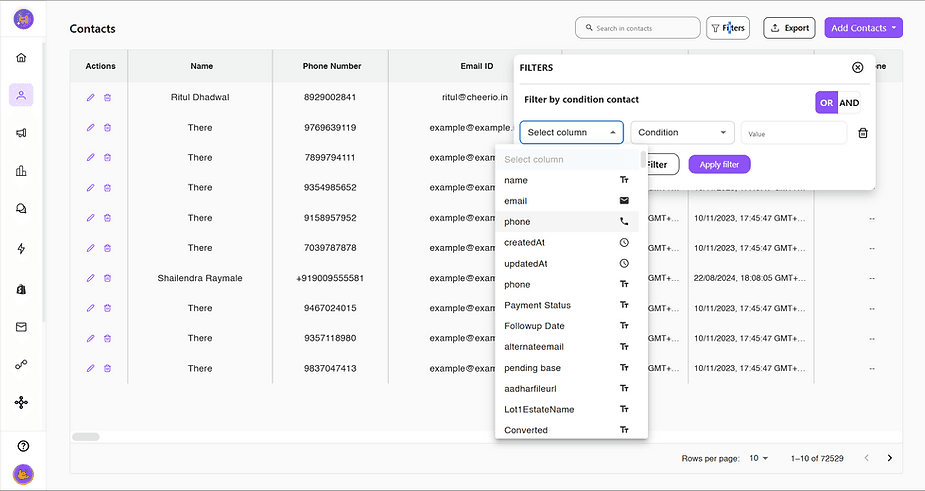
ree


Step 3: Select among different types of conditions like is equals to, is not equals to, contains, does not contain, is empty, or is not empty. following our example: we will select "contains"
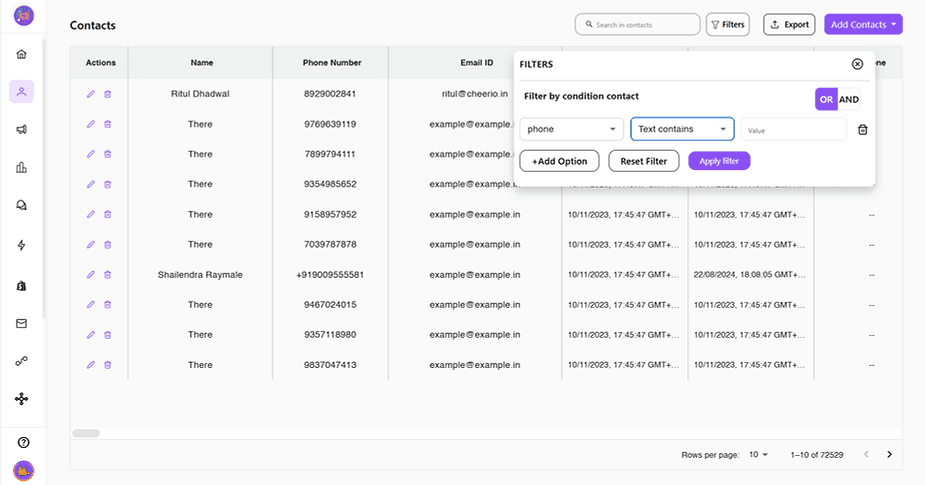
ree


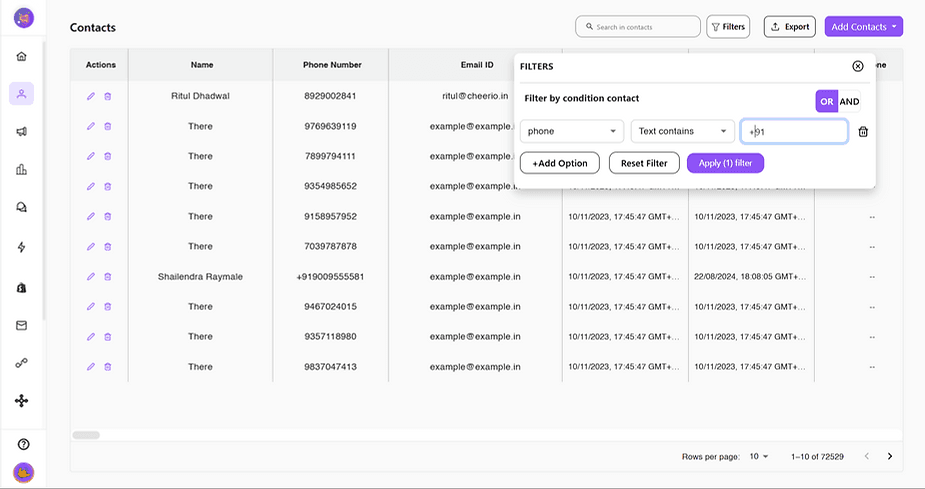
Step 4: Enter the matching value which you want to filter out. following our previous example we will add +91.
ree


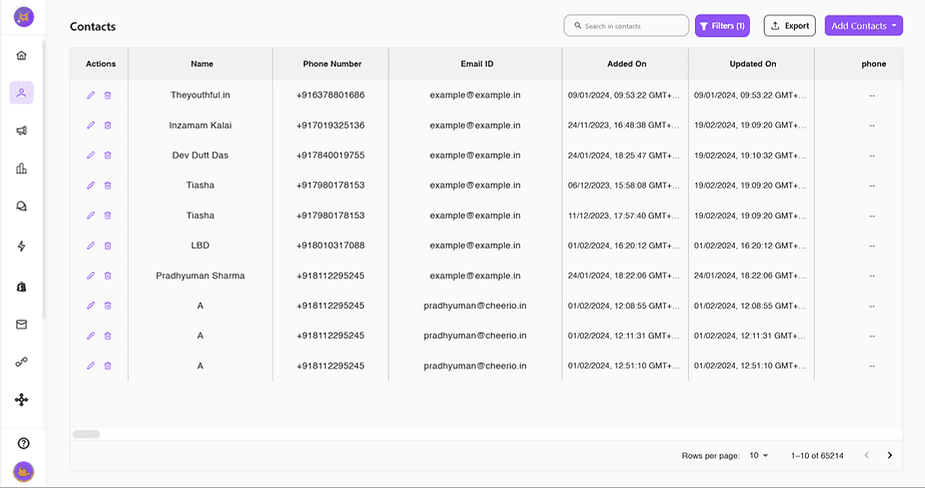
Step 5: Click "Apply Filter" and it's done. All your filtered contacts will be shown in the table.
ree


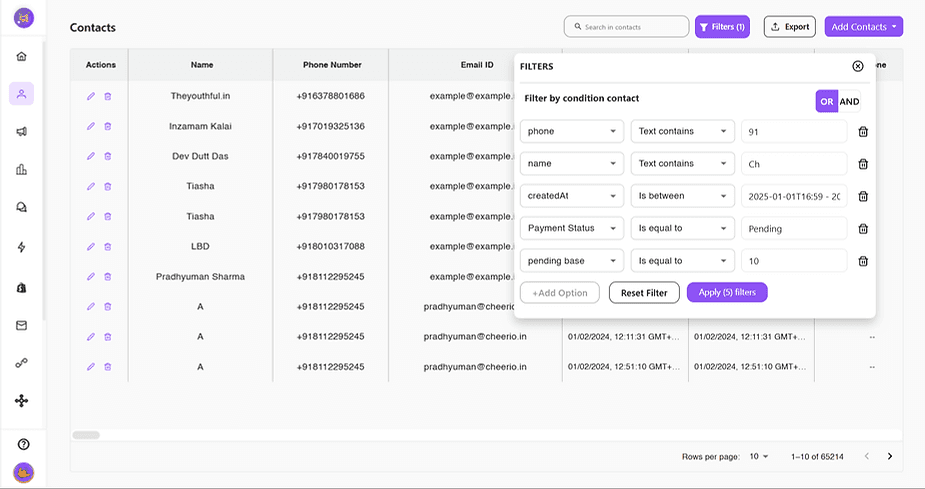
For advanced filtering, You can filter up to 5 different attributes at the same time using AND/OR Conditions.
ree


What are AND/OR Conditions?

Let's take an example I want to filter the data out of 100 contacts who are in the e-commerce business, have their website, and are living in Delhi.

Now because I want all the 3 conditions to be satisfied I will use "AND" here but just in case I only wanted any of these conditions to be satisfied I will use "OR"

In case you've doubts or queries. Feel free to reach out us at support@cheerio.in
Recommended for You

How to create Click-to-Instagram DM (CTD) Ads & Post-Message Automation in Cheerio AI

January 29, 2026

Collect UPI Payments Directly Inside WhatsApp with Cheerio AI

January 24, 2026

How to create and manage custom contact attributes on Cheerio?

December 14, 2025

Pricing

Resources

Case Studies

Login
Book a Demo

See Cheerio AI in action

Schedule a demo to explore how Cheerio runs enterprise workflows across your systems and channels.

Book a demo

Trusted by enterprise teams running workflows at scale.

Running enterprise workflows with clarity and control.

admin@cheerio.in

Home

About

Features

Comparison

Testimonials

FAQ’s

Pages

Pricing

Blogs

Guides

Case Studies

Privacy Policy

Social

Linkedin

Instagram

Youtube

© 2026 Cheerio AI. All rights reserved.

Designed by Moonkraft Studio

See Cheerio AI in action

Schedule a demo to explore how Cheerio runs enterprise workflows across your systems and channels.

Book a demo

Trusted by enterprise teams running workflows at scale.

Running enterprise workflows with clarity and control.

admin@cheerio.in

Home

About

Features

Comparison

Testimonials

FAQ’s

Pages

Pricing

Blogs

Guides

Case Studies

Privacy Policy

Social

© 2026 Cheerio AI. All rights reserved.

Designed by Moonkraft Studio

See Cheerio AI in action

Schedule a demo to explore how Cheerio runs enterprise workflows across your systems and channels.

Trusted by enterprise teams running workflows at scale.

Book a demo

Running enterprise workflows with clarity and control.

admin@cheerio.in

Home

About

Features

Comparison

Testimonials

FAQ’s

Pages

Pricing

Blogs

Guides

Case Studies

Privacy Policy

Social

Linkedin

Instagram

Youtube

© 2026 Cheerio AI. All rights reserved.

Designed by Moonkraft Studio